















JEE Main 2027 Registration with JanParichay and e-Pramaan: NTA has officially released the JEE Main 2027 Session 1 application form on October 24, 2026. For the JEE Main 2027 registration, NTA has introduced MeriPehchaan, a government-backed Single Sign-On (SSO) platform for identity authentication during registration.
The platform offers three ID verification options, including DigiLocker, JanParichay, and e-Pramaan. Candidates can choose any of the available options for their digital identity authentication for JEE Main 2027 registration.
SciAstra guides you on how to complete the initial JEE Main 2027 registration process through JanParichay and e-Pramaan.
What Are JanParichay and e-Pramaan for JEE Main 2027 Registration?
JanParichay and e-Pramaan are government-based digital platforms used for initial identity verification for the JEE Main 2027 registration. NTA has introduced MeriPehchaan, a single Single Sign-On (SSO) platform for JEE Main 2027 registration. Under MeriPehchaan, NTA offers three ID authentication options, including DigiLocker, JanParichay, and e-Pramaan. Candidates can choose any of the provided options to complete their initial identity authentication.
Documents and Details Required for JEE Main 2027 Registration
Candidates require the following documents to complete identity authentication and the application form for the JEE Main 2027 Session 1:
Aadhaar card, PAN card, Driving License, or APAAR ID (any one needed for ID authentication)
Active mobile number and email address.
Class 10 and Class 12 academic details.
Scanned photograph, signature, and Class 10 marksheet.
Login credentials for the selected authentication method.
Also Read: JEE Main Registration Date 2027 (Session 1 & Session 2)
How to Register for JEE Main 2027 with JanParichay and e-Pramaan
Below is the step-by-step process for JEE Main 2027 registration with JanParichay and e-Pramaan:
Step 1: Visit the Official JEE Main Website
Open the official NTA JEE Main website, jeemain.nta.nic.in, and access the registration link through the candidate activity section.

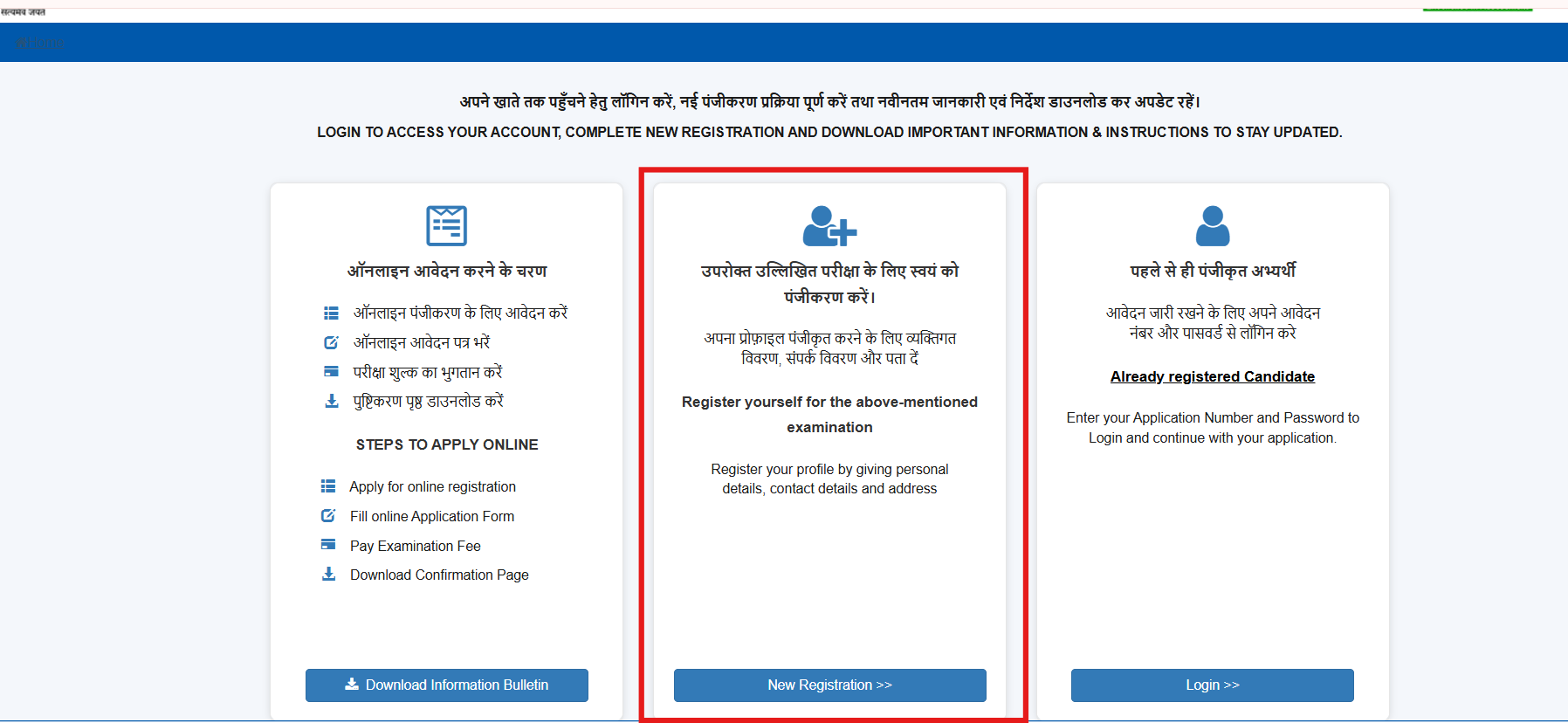
Step 2: Select New Registration Option
Once you click the application page, you will be redirected to the declaration page. On this page, click the “New Registration” option. You will be redirected to the identity authentication page.
Step 3: Select the JanParichay or e-Pramaan Login Option
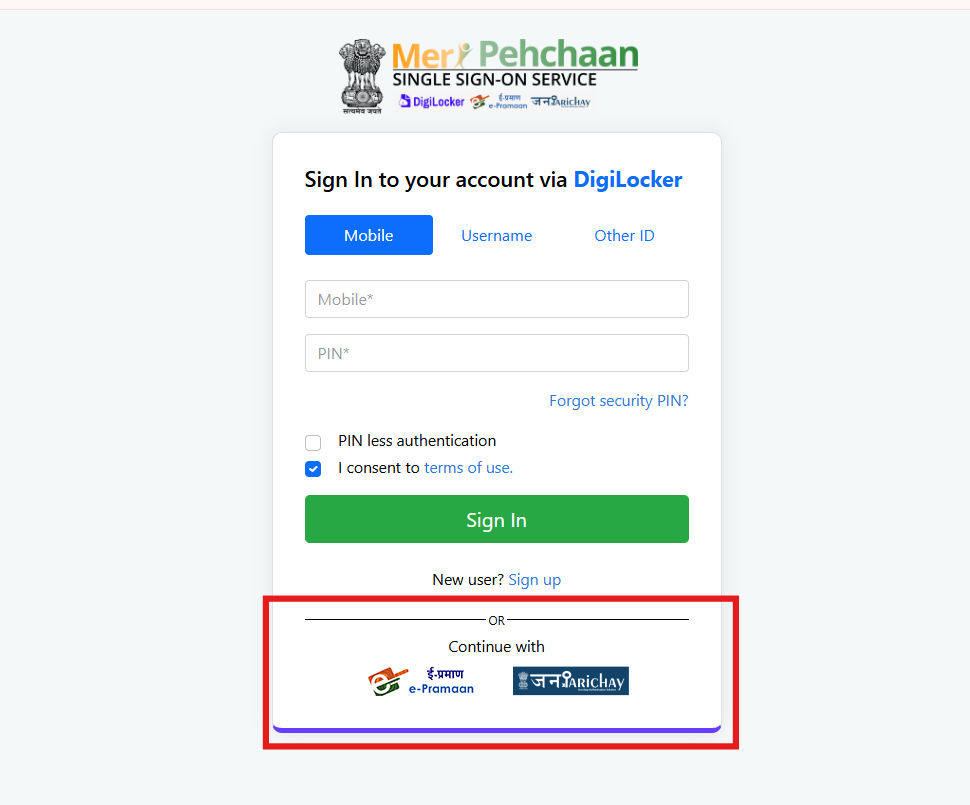
The DigiLocker option will open automatically under MeriPehchaan. If you don't want to use DigiLocker, choose the JanParichay or e-Pramaan option available below on the login page.
Step 4: Enter Your Login Credentials
Enter your JanParichay Username and password to sign in. To sign in to e-pramaan, you can you the following credentials:
Username and Password
OR
Mobile Number and Password
OR
ID or Number of Aadhaar/PAN/Driving License and Password
If you do not have a JanParichay or an e-Pramaan account, create a new one.
Step 5: Complete Identity Authentication
Complete the identity authentication process requested by NTA by consenting to the identity card.
Step 6: Proceed to the JEE Main 2027 Application Form
Your JEE Main 2027 application number will be generated. Now, follow the portal's instructions to continue with the registration. Fill in the required details and complete the JEE Main 2027 application form.
What are JanParichay and e-Pramaan in the JEE Main 2027 registration?
JanParichay and e-Pramaan are digital identity services that allow candidates to verify their credentials during JEE Main 2027 registration. Both are integrated into MeriPehchaan, a government-backed Single Sign-On (SSO) platform that provides access to multiple digital identity services through a single interface. Along with DigiLocker, these platforms give candidates alternative ways to complete the identity verification process on the NTA registration portal.
Is JanParichay mandatory for JEE Main registration?
No, JanParichay is not mandatory for the JEE Main 2027 registration. The MeriPehchaan platform offers three identity authentication modes, including DigiLocker, JanParichay, and e-Pramaan. Candidates can use any of the provided options to complete their JEE Main 2027 registration.
Can I register for JEE Main through e-Pramaan?
Yes, you can register for JEE Main 2027 through e-Pramaan. You can choose the e-Pramaan option on the identity authentication page and sign up for e-Pramaan. Log in using your generated ID and password and complete the identity verification with the NTA.

How to Create a JanParichay Account for JEE Main 2027
Follow the steps below to create a JanParichay account for the JEE Main 2027 registration:
Visit the JEE Main website, jeemain.nta.nic.in, and click “Online application form for JEE (Main) 2027 - Session 1” under the candidate activity section.
Click on the New Registration button. You will be redirected to the authentication login page.
Click on the JanParichay option below on the login page.
Click on the “New User? Sign up for MeriPehchaan” option below.
A sign-up page will open for JanParichay.
Enter your Mobile No., click on Generate OTP, and verify the OTP.
Now, carefully enter the requested details on the sign-up page, such as Name, DOB, Gender, User ID, create a Password, and click "Submit”.
Now, your JanParichay account has been successfully created.
Use the created login ID and password for JanParichay to log in to your account and verify your identity with the NTA.
Also Read:
How to Create an e-Pramaan Account for JEE Main 2027
Below are the complete steps to create an e-Pramaan account for the JEE Main 2027 registration:
Visit the JEE Main website, jeemain.nta.nic.in, and click “Online application form for JEE (Main) 2027 - Session 1” under the candidate activity section.
Click on the New Registration button. You will be redirected to the authentication login page.
Click on the e-Pramaan option below on the login page.
Click on the “New User? Sign up for MeriPehchaan” option below.
A sign-up page will open for e-Pramaan.
Enter your Mobile No., click on Generate OTP, and verify the OTP.
Now, carefully enter your Name, Gender, DOB, UserName, create a Password, and click on the Sign Up button.
Now, your e-Pramaan account has been successfully created.
Use the created login ID and password for e-Pramaan to log in to your account and verify your identity with the NTA.
Also Read: JEE Main Previous Year Question Papers (PYQs)
What Details Are Automatically Fetched During JEE Main 2027 Registration?
Under the MeriPehchaan platform, NTA will automatically fetch certain identity information from the selected identity provider during the JEE Main 2027 registration, such as:
Name: The candidate's name as recorded with the selected identity provider.
Date of Birth: The candidate's registered date of birth.
Gender: Gender information available in the linked identity records.
Contact details: Registered mobile number and email address, where applicable.
Address: Residential address details available through the selected identity provider.
Which details are fetched automatically through MeriPehchaan for JEE Main registration?
Under the MeriPehchaan platform, NTA will automatically fetch certain identity information, such as name, date of birth, gender, mobile number and address, from the selected identity provider during the JEE Main 2027 registration.
Is DigiLocker mandatory for JEE Main registration?
DigiLocker is not mandatory for JEE Main 2027 registration. NTA has introduced the MeriPehchaan Single Sign-On (SSO) platform to do authentication during registration. The MeriPehchaan platform integrates three identity service providers, such as DigiLocker, JanParichay and e-Pramaan. Candidates can use any of these to verify their identity.
How can I download the JEE Main application form confirmation page?
After successfully submitting the application form and paying the fee, candidates can log in to the official JEE Main portal and download the confirmation page for the application form.
Important Instructions for JEE Main 2027 Registration
Follow the below-provided instructions strictly while doing the JEE Main 2027 registration:
Candidates must verify all pre-filled details carefully before proceeding.
Candidate name and date of birth in the application form must be the same as mentioned in the Class 10th Certificate/Mark sheet.
Candidates must log in using their own DigiLocker/JanParichay/e-Pramaan (MeriPehchaan) credentials to avoid discrepancies in identity verification and biometric data at subsequent stages of the application process.
Complete the identity verification process as instructed by NTA.
Review the JEE Main 2027 application form before final submission.
Save the generated JEE Main 2027 application number and password for future logins.
Pay the applicable examination fee and download the confirmation page after successful submission.
Also Read: Steps to Recover JEE Main 2027 Application Number